A platform specifically developed for the Delphi Method and Healthcare Professional Experts (HPE).
A platform designed for experts, healthcare professionals, and, more recently, patients to create accounts and engage in Delphi projects.
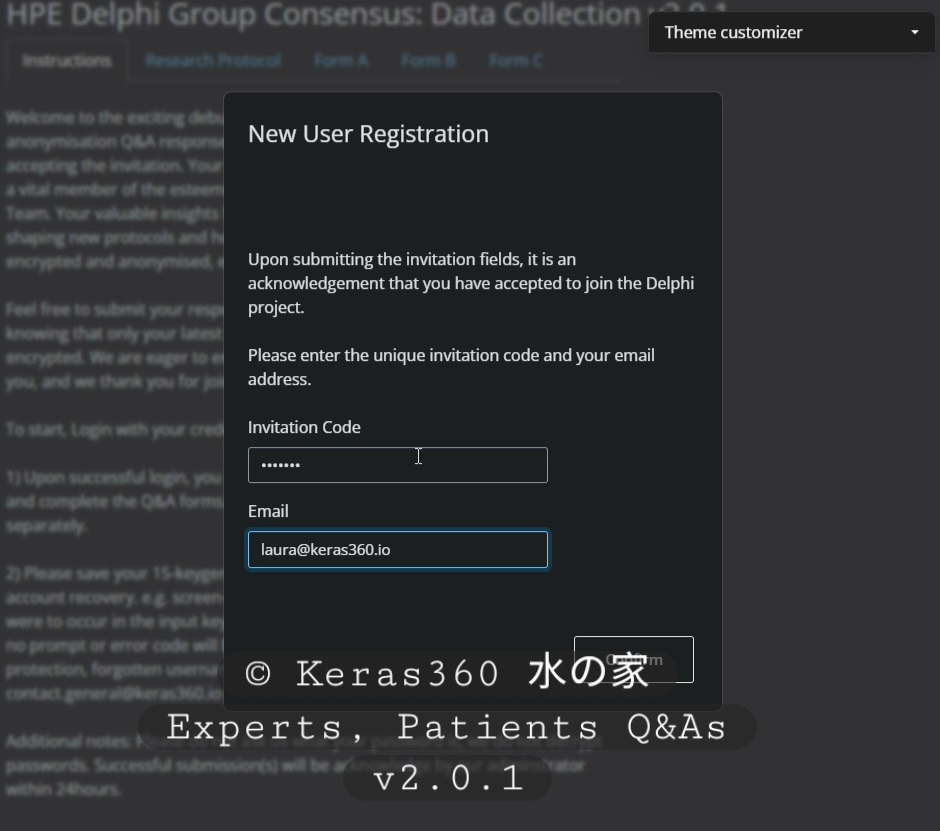
Starting April 1st, 2026, it will be mandatory to obtain an invitation code in order to register as a new user and the project code to participate in Delphi studies.
To successfully complete the registration process, it is imperative that you adhere to the provided instructions. We have emphasized the importance of securely storing your 15-keygen verse; it is advisable to keep it in a notepad or Word document, exactly as sequenced and supplied by the Keras360 HPE server. Your unique 15-keygen verse will be provided upon successful registration.
P.S.: Slow buffering might cause a poor visual resolution, please wait for the video to complete loading for optimal experience.
What is new in HPE version 2.0.1?
Keras360 will now distribute an invitation code to all new participants. It is now a requirement for all new participants to complete the registration process with the invitation code. In the past, individuals could create an account without an invitation code; however, participation in the Delphi Q&A forums necessitated the submission of the project code.
I have participated in Delphi-HPE, and I have registered for an account in the previous study. Do I need to re-register?
A re-registration is not required. If your profile exists in our database and you have received an invitation code to contribute, your encrypted profile would be linked to the present study.
How and when are my responses encrypted?
The instant you press the ‘Submit’ button, a window appears confirming that your responses have been successfully submitted.
How do I receive the invitation code and project code to join Delphi-HPE study?
Our project code is directly aligned with the research study group, while the invitation code is disseminated to a randomly assigned list of participants who possess the requisite skills and knowledge pertinent to the project’s objectives.
I have misplaced my 15-keygen, and I can’t reset my password.
It is regrettable to contemplate the potential loss of your Delphi credit points, which may necessitate your withdrawal from an active open-call Delphi project. In the circumstance of a closed-call project, there exists the possibility of registering for a new account. Please be advised that, although DELPHI-HPE is developed by Keras360, our protocol unequivocally stipulates that none of the employees have the capability to access the 15-keygen verse allocated to you by the DELPHI-HPE server.
Do I need to know anything about the fox decrypter?
The decrypter is designed for the primary analyst and principal investigators of the project. You may find it beneficial to explore additional information regarding this tool on the website.
Last updated on March 5th, 2026
 Keras360 水の家